






PortaOne Workflows

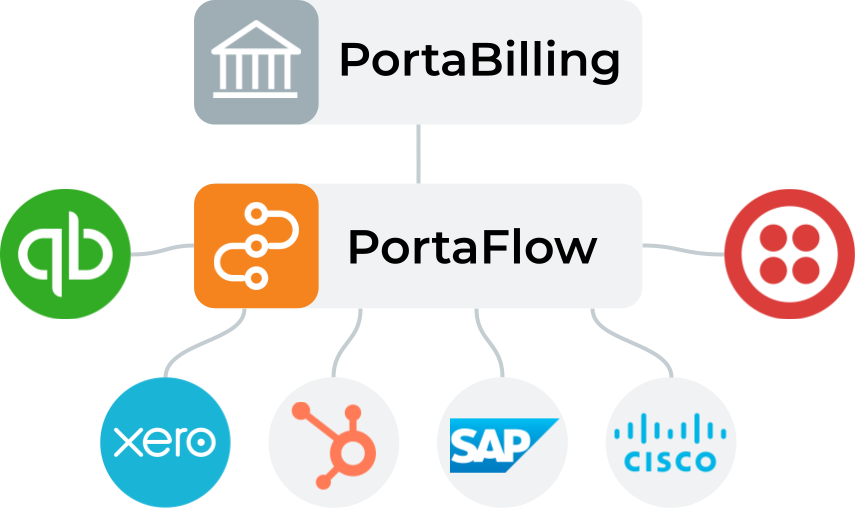
An easy-to-use, visual, low-code iPaaS integration platform that connects the components of your existing technology stack, including CRM, Accounting, Customer Engagement, and eCommerce platforms, with PortaBilling.

PortaOne Workflows what it is

What is it?

PortaOne Workflows is a robust and user-friendly Integration Platform as a Service (iPaaS) that empowers you to effortlessly build integrations between PortaBilling and other business applications.

Powered by Boomi, it connects PortaBilling with various business applications.

Use existing PortaOne integrations as a template or configure your own with just a few clicks.

Combine multiple products into a single, ultra-powerful solution in just a few days.

Connect seamlessly with CRM, ERP, accounting and hundreds of popular applications without any coding.

Traditional integration methods are costly and complex

If your company relies on data from multiple systems and applications, manually handling that data can result in the following challenges:

data
workflow

Discover a better way

With PortaOne Workflows you’ll experience an easier way to tackle data sync and integration challenges, capitalizing on an integration platform as a service platform.

Self-sufficiency

Access a low-code/no-code platform for effortless workflow creation.

Best support

Benefit from best-in-industry support and a thriving community.

Quick launch

Start selling new products within weeks with an accelerated launch process.

Fair pricing

Enjoy simple SaaS fees based on the number of connected systems.

Engagement

Involve non-technical team members for increased collaboration.

p1 success stories

Flexible Service Options

Choose the approach that suits you best - whether you prefer self-management or leveraging PortaOne's expertise for a seamless and accelerated implementation process that caters to your specific requirements.

The comprehensive PortaOne service package includes:

Personalized consultation

Enjoy 5 hours/month of one-on-one consultation for expert guidance.

Experienced Boomi developers

Our team brings valuable past experiences, helpful hints, and innovative ideas.

Comprehensive solutions

We perform thorough analysis, design solutions, and execute seamless implementation and rollout processes.

excited

What you can do ...

Check out these functionalities that help you build, deploy, and manage your workflows with less effort, more independence, and more results:

Build

Effortlessly create workflows with a user-friendly no-code UI or low code (JS/Groovy) for advanced data transformation.

Deploy

Choose from flexible deployment scenarios, including Boomi Cloud for quick setup or Private Cloud for enhanced security and performance. Or, leverage your existing PortaBilling server for staging systems.

Manage

Access advanced execution reporting and management interfaces through Web, Email, and API for effective monitoring and control of your workflows.

Client feedback

Hear what our customers say about utilizing a powerful and empowering iPaaS integration solution built with a visual low-code/no-code platform.

p1 workflow

Real integration examples

Explore a variety of integrations available to PortaOne Workflows subscribers:

Integration with PCRF to automate content-based billing

Pass the info about depleted quotas via the Spending Limit Control API service for 5G systems (3GPP TS 29.594).

Data sync from SAP Business One to PortaBilling

Enable the automated creation of customer records, the synchronization of transactions, and the addition of SIM cards to PortaBilling as they are triggered by events in the SAP Business One ERP system.

Automated invoicing and payment sync

Enable the automated import of invoices/payments from PortaBilling into an external accounting system, e.g., Xero or Bexio.

Integration with Cisco IoT Control Center (formerly Cisco Jasper)

Configure an automated workflow for IoT/M2M SIM card provisioning, e.g., a SIM card is activated for a retail customer only after a successful payment

Combined quotas for IoT/M2M SIM cards

Combine quotas into a shared pool when a customer activates multiple SIM cards with the same plan

Integration with MTN, Globalscape, and Google Maps

A workflow for mobile data service provided at a fixed address – it dynamically allocates mobile numbers to PortaBilling accounts, provisions subscriber location to MTN, and notifies about service usage from a different address (i.e., a service violation)

Integration with Freshdesk

Enable the automated creation of tickets in the Freshdesk helpdesk support system when specific events happen in PortaBilling, e.g., a new account is created

HubSpot-to-PortaBilling sync of customer records

Enable the automated creation of a customer record in PortaBilling when your sales manager successfully completes a sale (i.e., when the customer deal is marked “Closed Won” in the HubSpot CRM)

PortaBilling-to-HubSpot sync of customer records

Enable the automated creation of a customer record in the HubSpot CRM after a new customer is created in PortaBilling (e.g., the customer signs up via the CloudPBX Signup Portal)

Cloud PBX provisioning based on HubSpot data

Pass the parameters of a new PBX customer deal in the HubSpot CRM to the CloudPBX Onboarding Wizard (e.g., product, number of phone lines sold, purchased add-ons, etc.)

Integration with QuickBooks

Import invoices and payments from PortaBilling to QuickBooks accounting software and reconcile invoices and e-payments in both systems

Your own custom Workflows integration

Do you need something that’s not on the list? You can create new types of integrations either by yourself or with the assistance of PortaOne professionals.

How it works

PortaBilling is your hub for customer management, service configuration, billing, and online charging. PortaOne Workflows acts as the binding element, connecting applications and enabling workflows to execute seamlessly across multiple systems.

PortaOne Workflows how it works scheme
  • Customer Care agent manages customers and service configuration through PortaBilling’s web interface.
  • PortaBilling notifies PortaOne Workflows of service configuration updates.
  • Workflows can interact with the PortaBilling API, connect with other apps via connectors, and notify Customer Care of progress.
  • NOC and data owners use the web UI to ensure processing and data consistency.
PortaOne Workflows playlist
We’ve collected so many inspiring tips, how-tos, and use cases for Boomi-based PortaOne Workflows that we’ve had to collect them all in one place. Visit our YouTube playlist for plenty of ideas on how this flexible, low-code integration platform could streamline your operations.
man in blue and white plaid button up shirt

How you benefit

With PortaOne Workflows, you get an integration solution that helps you

Talk with us

Unlock efficiency, enhance customer experience, and save costs with PortaOne Workflows.

Contact us now for more information and get started on optimizing your IT projects.

Schedule a personal (video) call with sales or technical experts
Ask for a thorough presentation delivered by our professional team
Request all technical specs and documentation

FAQ

Deployment and Infrastructure

What is the difference between PortaOne Workflows and traditional integration methods?

Traditional integrations typically require developers to write and maintain custom code that calls the PortaBilling API and external system APIs to synchronize data. This includes implementing event queuing, retry logic, and error handling.

PortaOne Workflows provides two solutions to reduce that effort:

  1. NSPS is a lightweight cloud provisioning system designed for real-time provisioning of subscriber-level events (such as SIM card activation or product change). With NSPS, you only need to write a small microservice that receives ready-to-use subscriber data from NSPS and calls the target system’s API to apply the change. NSPS automatically manages everything else including extracting the needed subscriber data (e.g., their product settings) from PortaBilling, queuing events, and handling retries and errors.
  2. Boomi is a no-code/low-code integration platform (iPaaS) for automating complex business processes. Instead of building integrations from scratch, you can use visual workflow design, hundreds of prebuilt Boomi connectors, and PortaOne’s ready-to-use telecom workflow templates to integrate PortaBilling with CRM, ERP, accounting, helpdesk, and other enterprise applications.

With PortaOne Workflows, you can connect PortaBilling to external systems with minimal or no coding, and launch your services faster.

Let’s look at each solution included in PortaOne Workflows separately.

NSPS

NSPS is typically used for simple, one-step provisioning actions. When a subscriber lifecycle event occurs (such as SIM activation or a plan change), NSPS picks it up, enriches it with all the relevant data (such as subscriber service configuration), and delivers it to your connector. The connector is a small microservice that receives the event data from NSPS and calls the target system’s API to apply the change (e.g., to activate a SIM card in an HSS or update a subscriber’s profile in an IPTV platform). NSPS manages event queuing, retries, and replays of failed events, so you don’t need to implement this logic in your connector.  

Boomi low-code platform

A Boomi workflow is a configured sequence of steps, and Boomi’s platform is typically used for complex, multi-step workflows that synchronize PortaBilling with business applications.. For example, when a new customer is created in PortaBilling, a workflow might create a corresponding record in a CRM, update an order in an ERP, and send a confirmation email to the customer. 

A workflow can be triggered automatically by an event in PortaBilling, launched manually, or run on a schedule. Boomi uses PortaBilling’s API to obtain the necessary context, and connects to external applications via pre-built or custom connectors, executing the configured sequence of actions.

PortaOne Workflows integrates with the Boomi low-code platform to work with business applications such as CRM, ERP, accounting, and helpdesk systems. 

You can leverage hundreds of prebuilt connectors developed and maintained by Boomi and its partner ecosystem to quickly connect PortaBilling with widely used systems such as Salesforce, HubSpot, SAP, and many more, without building connectors from scratch. On top of that, PortaOne provides ready-to-use sample workflows for common telecom use cases which you can use as templates and adjust only the parameters you need. Examples include automated invoice and payment synchronization with an external accounting system, customer data exchange between CRM and billing, or automatic ticket creation in a support system based on specific events. For unique scenarios you can create a custom integration in Boomi using its visual no-code UI or low-code scripting.

For NSPS, your team (or your integration partner) typically develops and maintains the connector that communicates with the external system. Any developer familiar with REST APIs and JSON can build a connector – no special knowledge of PortaBilling is required. PortaOne provides the NSPS connector implementation guide and a working sample connector on GitLab that you can use as a starting point and adapt for your system. New connectors can also be built using AI coding assistants. NSPS itself is deployed and managed by PortaOne in the cloud. 

On the Boomi platform, workflows which connect PortaBilling with external applications via connectors, can be configured by your own team, an external integration partner, or PortaOne engineers. If your team is taking this on, you’ll need someone proficient with Boomi’s architecture and low-code programming. PortaOne provides workflow templates that can be adapted to your business processes instead of building workflows from scratch. 

With NSPS, you can build connectors for any system that delivers services to end users and requires near real-time, one-step updates such as mobile network components (HSS, PCRF) or IPTV platforms.

With Boomi, you can connect PortaBilling to virtually any business application. For hundreds of widely used applications (such as Salesforce, HubSpot, SAP, QuickBooks, and Xero) prebuilt connectors are already available. For other systems, a custom connector can be developed.

More PortaOne Workflows information

Challenges of Expansion to Established Telecom Markets: The PortaOne Guide to Telecom Market Expansion

Your Guide to Telecom International Expansion

Telecom international expansion offers immense opportunities, but challenges like complex regulatory compliance and adapting to local market preferences require strategic planning. PortaOne’s guide shares insights from global experts to ensure your success

The 2024 PortaOne Barcelona Meetup Zhylenko & Khalenkov

PortaOne Barcelona Meetup 2024 Summary & Materials

The 2024 PortaOne Barcelona Meetup provided a unique opportunity for telco professionals to come together and collaborate. From insightful conversations with PortaOne executives to networking with industry peers, the event provided a relaxed atmosphere full of enriching interactions and valuable ideas

Join those
'in-the-know'

Never miss an update, software release, webinar, best practice or anything else.

Search PortaOne

Search

Hot topics