




PortaSwitch: Telecom Billing Software & SIP Softswitch Platform
PortaSwitch is PortaOne's Class 4 and 5 SIP softswitch with PortaBilling built in, so service providers route, charge, and invoice cloud PBX, SIP trunking, and wholesale voice on one platform.
Talk to a PortaSwitch expert500+ operators in nearly 100 countries run PortaOne.
What is PortaSwitch?
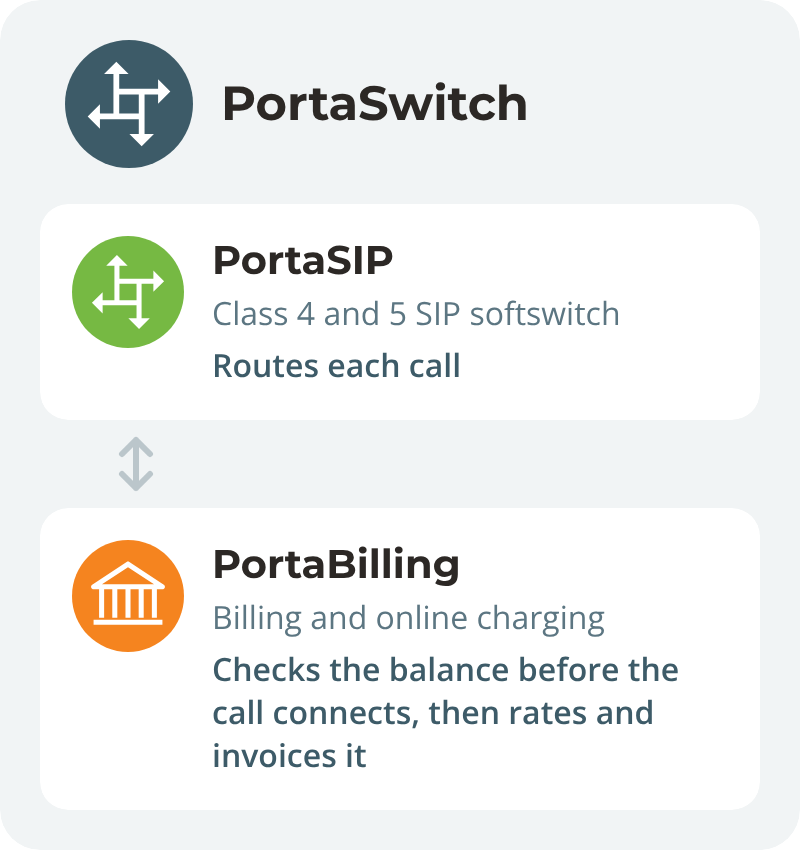
PortaSwitch combines two PortaOne products: PortaSIP, a Class 4 and 5 SIP softswitch, and PortaBilling, a convergent billing and online charging system.
PortaSwitch routes each call, checks it against the customer's balance before it connects, and rates and invoices it on the same platform. Service providers run cloud PBX, SIP trunking, wholesale, and calling cards on PortaSwitch.
When the switch decides what you can sell
Many voice providers run a switch from one vendor and a billing platform from another. The gaps show up with every new service.
Switch and billing from different vendors
Your platform blocks the next offer
- Your switch can't take you into business telephony
- Every new plan waits for a vendor ticket or a developer
- Usage reaches billing late, so prepaid balances run over
- Moving off the switch means customers lose features
- Switch and billing records disagree at month-end
With PortaSwitch
PortaSwitch routes, charges, and invoices on one platform
- Sell cloud PBX, SIP trunking, and wholesale voice on PortaSwitch
- Set up new tariffs in the PortaSwitch admin interface without a programmer
- PortaSwitch checks every call against the balance in real time
- Discovery identifies the features your customers use before migration starts
- PortaSwitch routes and rates each call on one platform
What you sell and run on PortaSwitch
Run the services business customers buy from you, and manage the system that keeps them running on one platform.
Sell cloud PBX your way
PortaSwitch runs auto attendants, queues, conferencing, voicemail, and call recording, billed per seat or minute.
Sell SIP trunks and wholesale routes
PortaSwitch runs Class 4 routing between carriers and Class 5 services for end users.
Give each reseller its own brand
PortaSwitch hosts resellers and their customers in separate white-label virtual environments.
Stop calls when funds run out
PortaSwitch locks part of the balance for each call and disconnects when it's spent.
Keep calls up when a site fails
A second PortaSwitch site takes over SIP traffic automatically when the main site goes down.
Connect your own AI agent
Your AI agent works inside PortaSwitch through MCP, under the permissions you set.
Not sure PortaSwitch covers your services?
Walk through what you sell today with a PortaOne voice platform expert.
PortaSwitch fits what you already run
Connect PortaSwitch to the systems your team and customers rely on.
What you run
With PortaSwitch
Note
Your billing or ERP system
Takes the CDRs exported from PortaSwitch
Move to PortaBilling later
Teams, CRM, helpdesk, accounting
Connected through the open API
Teams, Salesforce, HubSpot, Zendesk, Xero
Your own portal or app
Driven through the REST API
No admin screens needed for customers
Servers
Your own, physical or virtual
Or Oracle Cloud Infrastructure, or hybrid
Reports
SQL on the PortaSwitch database
Or Google BigQuery through AI DataLink
3CX
Runs alongside PortaSwitch
Some PortaOne customers run both
PortaSwitch is not a reporting platform. If your team relies on specific reports today, list them during discovery.
Moving from BroadWorks or NetSapiens to PortaSwitch
Discovery identifies the features your customers use before migration starts, and you decide how to handle each gap.
1
Map what you sell today
PortaOne analyzes your products, features, and business flows, and agrees on the scope in writing.
2
Decide on every gap
If PortaSwitch lacks a feature you need, PortaOne can build it, or you can choose another option.
3
Rebuild routing on PortaSwitch
Routing plans and carrier connections are rebuilt and verified on PortaSwitch, rather than simply copied.
4
Migrate customers in batches or all at once
You decide. With batches, the old switch and PortaSwitch run in parallel.
5
Keep the old system for invoice history
Active customers migrate with their current balances. Charge and invoice history remains accessible from the old system.
A small, clean migration takes three months. The time grows with the number of products, segments, and integrations.
Voice providers that run on PortaSwitch
From resellers that outgrew a rented platform to operators moving hundreds of thousands of customers.
500+
operators in nearly 100 countries run PortaOne
1,270
Recorded at 1,270 calls per second in production. Add servers to handle more call volume.
24/7
24/7 support from 180 PortaOne engineers
Sona Business moved from a rented platform to its own PortaSwitch
Netherlands-based Sona Business sells hosted unified communications to businesses through resellers. It started in a PortaSwitch virtual environment rented through another vendor, then moved to its own PortaSwitch deployment.

"The migration process was quite easy. We blocked off a few dates and informed our customers that we were doing a big migration and that they might experience some downtime. But it was very smooth; it went in a jiffy."
Read the Sona Business story
Telekom Malaysia moved roughly 500,000 prepaid calling-card customers off the iTALK platform, with PortaOne engineers writing the migration scripts.
Trusted by 500+ operators in nearly 100 countries









Deploy and pay exactly the way you want
Run your operations your way, with a choice of where to deploy PortaSwitch and how to pay for it.
Deployment scenarios
On-premise
Install on your own hardware and host it in your favorite datacenter.
In the cloud
Oracle datacenter hosting is available for SaaS subscriptions.
Payment options
Unlimited perpetual license
A one-time payment gets you an unlimited perpetual license for installation of a specified number of servers.
Monthly SaaS subscription
Based on a single value metric with an initial setup charge. Includes support. Hosting on Oracle Cloud is optional, and many customers run SaaS on their own servers.
Updates and upgrades
Configurator
Included with every option. A tool to automate server installations and update processes, enabling secure testing and rollback to a previous version if necessary.
Dual Version
Optional paid add-on. Our solution for smooth and painless updates across multiple major releases of PortaOne software: download the white paper
How PortaOne onboards our customers
Four steps from sign-up to a trained team, each with its own timeframe in business days.
1
Download
Sign up & pay; download or get the system in the cloud
2
Install
Installation for on-premise is done in-house by client
3
Systems check
Support teams verify and test protocols remotely
4
Learn
Your team receives training, usually 24 class-hours in total
Tell us what your switch can't do today
A PortaOne expert will map your services, customers, and integrations to PortaSwitch.
PortaSwitch FAQ
BroadWorks is being phased out for us. What can a voice provider replace it with?
PortaSwitch, PortaOne's Class 4 and 5 SIP softswitch with PortaBilling built in, is an option for voice providers replacing BroadWorks after support ends. It runs cloud PBX with auto attendants, call queues, conferencing, voicemail, and call recording. Every PortaOne-managed migration starts with discovery, where PortaOne lists the products and features your customers use, agrees on the scope in writing, and decides with you how to handle any features PortaSwitch doesn't yet support. Customers move in batches or all at once. A small, clean migration takes three months. Migrations with more products and integrations take longer.
We pay per extension even for phones nobody uses. How do other voice platforms charge?
With the unlimited perpetual license, PortaOne doesn't charge per extension or per seat. Instead, you license PortaSwitch per installation, and every function is included. The monthly SaaS subscription follows the number of CDRs PortaSwitch processes each month, and can be set up per extension or per seat instead. Optional Add-on Mart modules are priced separately. You decide what to charge your customers: PortaSwitch bills per seat, per extension, per channel, per minute, or a mix.
Which VoIP platforms give full CDR access, so we can check the carrier's invoice?
PortaSwitch keeps a CDR for every call containing the cost from the carrier and the price charged to the customer, so you can check a carrier's invoice against your own CDRs. In PortaSwitch, the General cost/revenue statistics report shows cost, revenue, and gross margin by customer, carrier, and destination, for any period up to the moment it runs. For your own checks, query the PortaSwitch database with SQL, or send the data to Google BigQuery through AI DataLink. PortaSwitch is not a reporting platform, so list the reports you rely on during discovery.
Can we host our cloud PBX platform in our own country?
Yes. PortaSwitch runs on your own servers, physical or virtual, so the platform and your customer data stay in your country. PortaOne can also host PortaSwitch on Oracle Cloud Infrastructure, or run it hybrid, with billing in the cloud and the switches on-premise. The unlimited perpetual license is for on-premise installations. The monthly SaaS subscription works on-premise or in the cloud.
What are the trade-offs of one platform for the switch and billing versus BroadWorks or Metaswitch plus separate billing?
With PortaSwitch, the softswitch and PortaBilling run on one platform and talk to each other directly in real time, so each call is checked against the balance before it connects and rated on the platform that routed it. With a separate switch and billing system, rating depends on CDRs passing from one system to the other, and each new service is set up in both. Some providers export PortaSwitch CDRs to their own billing or ERP system, so you can keep your current billing and move to PortaBilling later.
How can a service provider migrate existing customers from a legacy system (like BroadSoft or 3CX) to PortaSwitch with complete PBX configuration (such as customer profiles, SIP credentials, or routing rules)?
PortaOne starts every migration with a Discovery phase. A business analyst and migration engineer analyze the service provider’s requirements, existing documentation, and business flows, define what will and won’t be migrated, and identify any gaps. Together with the service provider, PortaOne prioritizes and estimates the high-priority items. The service provider then receives a “Scope of Work” document and timeline before anything progresses.
Direct access to the legacy software platform’s database is not mandatory. If the legacy vendor restricts data exports, PortaOne can work with standard-format files exported by the service provider from their system, and map data from that legacy system to PortaSwitch. If the legacy format requires adaptation or out-of-the-box tools do not fully cover mapping data, PortaOne engineers write custom migration scripts to handle the translation. If a feature the service provider relies on doesn’t exist in PortaSwitch yet, the development team can implement it in upcoming releases.
PortaOne can manage the migration process end-to-end, coordinating planning, data preparation, execution, and post-migration support.
Two migration strategies are available: run both systems in parallel and switch to PortaSwitch once migration is complete, or move everything in a single planned operation. Routing plans and carrier connections are rebuilt on PortaSwitch and verified, not copied.
Direct access to the legacy software platform’s database is not mandatory. If the legacy vendor restricts data exports, PortaOne can work with standard-format files exported by the service provider from their system, and map data from that legacy system to PortaSwitch. If the legacy format requires adaptation or out-of-the-box tools do not fully cover mapping data, PortaOne engineers write custom migration scripts to handle the translation. If a feature the service provider relies on doesn’t exist in PortaSwitch yet, the development team can implement it in upcoming releases.
PortaOne can manage the migration process end-to-end, coordinating planning, data preparation, execution, and post-migration support.
Two migration strategies are available: run both systems in parallel and switch to PortaSwitch once migration is complete, or move everything in a single planned operation. Routing plans and carrier connections are rebuilt on PortaSwitch and verified, not copied.
How does PortaSwitch ensure geo-redundancy and automatic SIP traffic failover during a data center outage?
PortaSwitch is built on a multi-site architecture comprising a main site and secondary sites in separate locations. Each secondary site continuously replicates data from the main site, so it always has the latest customer and service data.
Traffic distribution between sites is managed by the Dispatching Session Border Controller (DSBC). If the main site becomes unavailable due to a power outage, network failure, or a natural disaster, the DSBC automatically redirects all incoming SIP traffic and device registrations to the secondary site, which switches into stand-alone mode, all without any manual intervention. Customers can continue making and receiving calls, and their balances are tracked accurately during the outage. Once the main site comes back online, the DSBC redirects traffic back to it, and all accumulated changes are synced automatically.
Traffic distribution between sites is managed by the Dispatching Session Border Controller (DSBC). If the main site becomes unavailable due to a power outage, network failure, or a natural disaster, the DSBC automatically redirects all incoming SIP traffic and device registrations to the secondary site, which switches into stand-alone mode, all without any manual intervention. Customers can continue making and receiving calls, and their balances are tracked accurately during the outage. Once the main site comes back online, the DSBC redirects traffic back to it, and all accumulated changes are synced automatically.
How does PortaSwitch enable real-time billing for SIP calls and prevent prepaid balance overruns?
PortaSwitch handles authorization and charging in real time through its billing engine, PortaBilling. When a customer dials a number, PortaBilling authenticates the caller, checks their available balance, and authorizes the call before it connects. If the balance runs out mid-call, the call is disconnected.
PortaBilling prevents overdrafts through fund locking. For every call, the system locks a portion of the customer’s balance to cover the next call interval (e.g., the next five minutes of a call). Those funds are unavailable for any other concurrent session. As the call progresses, the system re-authorizes and locks funds for the next interval.
The same mechanism applies to shared service quotas. If several users share a pool of minutes, for example, a “Family” package where all minutes are shared between the customer’s family member accounts, PortaBilling locks a portion of that quota for each active call, preventing users from exceeding the shared limit.
PortaBilling prevents overdrafts through fund locking. For every call, the system locks a portion of the customer’s balance to cover the next call interval (e.g., the next five minutes of a call). Those funds are unavailable for any other concurrent session. As the call progresses, the system re-authorizes and locks funds for the next interval.
The same mechanism applies to shared service quotas. If several users share a pool of minutes, for example, a “Family” package where all minutes are shared between the customer’s family member accounts, PortaBilling locks a portion of that quota for each active call, preventing users from exceeding the shared limit.
What is the difference between a perpetual license and a SaaS subscription, and what are the deployment options for PortaSwitch?
PortaSwitch supports two deployment options: on-premises, where the platform is installed on the service provider’s own hardware, and cloud, where the platform is hosted and managed by PortaOne in an Oracle Cloud Infrastructure data center. Two commercial models are available, depending on the deployment option chosen.
The unlimited perpetual license is priced per installation, defined by a maximum number of physical or virtual servers. It does not depend on the number of subscribers, concurrent calls, or any other usage-based metric. This model is available for on-premises deployments only and also includes a complimentary period of 24/7 technical support with access to all feature updates, full source code, database schema, and REST API.
The SaaS subscription (pay-as-you-go) is a monthly fee based on the number of CDRs (records of calls, messages, subscriptions, data sessions, and reseller charges) processed each month. No license purchase is required. This model is available for both on-premises and cloud deployments.
Both models include initial system setup and customized online training.
The unlimited perpetual license is priced per installation, defined by a maximum number of physical or virtual servers. It does not depend on the number of subscribers, concurrent calls, or any other usage-based metric. This model is available for on-premises deployments only and also includes a complimentary period of 24/7 technical support with access to all feature updates, full source code, database schema, and REST API.
The SaaS subscription (pay-as-you-go) is a monthly fee based on the number of CDRs (records of calls, messages, subscriptions, data sessions, and reseller charges) processed each month. No license purchase is required. This model is available for both on-premises and cloud deployments.
Both models include initial system setup and customized online training.
What is an SIP softswitch?
An SIP softswitch is software that routes and processes voice and video calls over an IP network using the Session Initiation Protocol (SIP). An SIP softswitch replaces traditional circuit-switched telephone exchanges. An SIP softswitch handles SIP signaling which includes setting up calls (e.g., authenticating callers and applying routing rules), making modifications (e.g., holding or transferring), and ending calls. The actual voice or video stream typically flows directly between endpoints or through a separate media component.
A modern softswitch platform can support a wide range of telecom services, such as:
– Wholesale VoIP with least-cost routing or routing based on quality metrics, and high concurrent call capacity.
– Cloud PBX services with auto attendants, call queues, conferencing, and voicemail.
– SIP trunking for connecting on-premises PBXs to the network.
– Calling, SMS, and chat via web or mobile applications.
When evaluating softswitches, it’s critical to consider the billing system that works with the softswitch to monetize the provided services. PortaSwitch is PortaOne's SIP softswitch, with PortaBilling built in to rate and invoice every call.
A modern softswitch platform can support a wide range of telecom services, such as:
– Wholesale VoIP with least-cost routing or routing based on quality metrics, and high concurrent call capacity.
– Cloud PBX services with auto attendants, call queues, conferencing, and voicemail.
– SIP trunking for connecting on-premises PBXs to the network.
– Calling, SMS, and chat via web or mobile applications.
When evaluating softswitches, it’s critical to consider the billing system that works with the softswitch to monetize the provided services. PortaSwitch is PortaOne's SIP softswitch, with PortaBilling built in to rate and invoice every call.
What is the difference between a Class 4 and a Class 5 softswitch, and can both run on a single platform?
Class 4 softswitches route traffic between carriers and networks, while Class 5 softswitches provide calling services to end users.
A Class 4 softswitch sits between carrier networks, routing large volumes of voice traffic across regions and countries. Its primary functions are least-cost routing and handling large volumes of concurrent calls. Wholesale VoIP providers and international carriers typically operate at this layer.
A Class 5 softswitch handles subscriber-facing services (such as voicemail, auto-attendants, call forwarding, and conferencing), routing calls to specific devices and applications. Cloud PBX providers typically use Class 5 functionality.
In practice, the two classes work together. For example, a call can start on a Class 5 softswitch, pass through one or more Class 4 softswitches, and terminate through another Class 5 softswitch. Most SIP softswitches can provide both Class 4 and Class 5 functionality, allowing a service provider to handle wholesale transit and retail end-user services. PortaSwitch runs both on one platform: Class 4 routing between carriers and Class 5 services such as cloud PBX for end users.
A Class 4 softswitch sits between carrier networks, routing large volumes of voice traffic across regions and countries. Its primary functions are least-cost routing and handling large volumes of concurrent calls. Wholesale VoIP providers and international carriers typically operate at this layer.
A Class 5 softswitch handles subscriber-facing services (such as voicemail, auto-attendants, call forwarding, and conferencing), routing calls to specific devices and applications. Cloud PBX providers typically use Class 5 functionality.
In practice, the two classes work together. For example, a call can start on a Class 5 softswitch, pass through one or more Class 4 softswitches, and terminate through another Class 5 softswitch. Most SIP softswitches can provide both Class 4 and Class 5 functionality, allowing a service provider to handle wholesale transit and retail end-user services. PortaSwitch runs both on one platform: Class 4 routing between carriers and Class 5 services such as cloud PBX for end users.
How can a SIP softswitch platform be updated without downtime?
When PortaSwitch runs on two sites, it updates while your live traffic keeps running. Before a maintenance release is deployed, your secondary site takes over: calls already in progress on the main site finish normally, new calls and registrations go to the secondary site, and PortaSwitch keeps charging calls and updating balances. PortaOne Support then updates the main site, switches traffic back to it, then updates the secondary site the same way. Nobody on a call notices, and PortaOne Support can roll the update back the same way. On a single-site PortaSwitch, PortaOne Support schedules each update around your off-peak hours. Fixes for the most critical security issues reach current PortaSwitch releases as custom patches, without waiting for a regular update.
Related: Migrating to PortaSwitch · Metaswitch end of life · VOS3000 alternative · PortaSwitch vs Sippy · MOR alternative · Cloud PBX · SIP trunking · AI agents via MCP