






Workflow automation for PortaBilling

Connect PortaBilling to your network and business systems. Choose the workflow solution that fits your integration needs.

What are you trying to automate?

PortaOne offers two workflow solutions, each designed for a different type of automation.

New Service Provisioning System (NSPS)

For telecom provisioning and custom integrations

Build API-driven integrations between PortaBilling, network elements, and external systems with custom logic and event-driven automation.

Best suited for:
Engineering teams, solution architects, and system integrators.

Boomi Workflows

For business process automation

Build low-code workflows that connect PortaBilling with CRM, ERP, finance, ticketing, and other business applications.Build low-code workflows that connect PortaBilling with CRM, ERP, finance, ticketing, and other business applications.

Best suited for:
Business operations, IT, finance, customer success, and cross-functional teams.

PortaOne Workflows what it is

Common workflow use cases

From subscriber provisioning to customer onboarding, PortaOne workflow solutions help automate the processes that connect PortaBilling with the rest of your business.

NSPS

Subscriber provisioning

Automatically activate, modify, suspend, or terminate subscriber services on network elements when changes occur in PortaBilling.

Network integration

Synchronize subscriber data with HSS, PCRF, SBCs, IPTV platforms, and other telecom infrastructure.

SIM lifecycle management

Trigger SIM activation, replacement, or status changes in external provisioning systems.

Custom API integrations

Connect PortaBilling to proprietary or third-party systems using custom connectors and event-driven automation.

Boomi Workflows

Customer onboarding

Create and synchronize customer accounts across PortaBilling, CRM, ERP, and other business applications.

Order fulfillment

Automate the flow of customer, product, and service data between sales, billing, and operational systems.

Finance and ERP integration

Synchronize invoices, payments, accounting records, and financial data with ERP and accounting platforms.

Business process automation

Coordinate approvals, notifications, ticketing, and other multi-step workflows across enterprise applications.

How it works

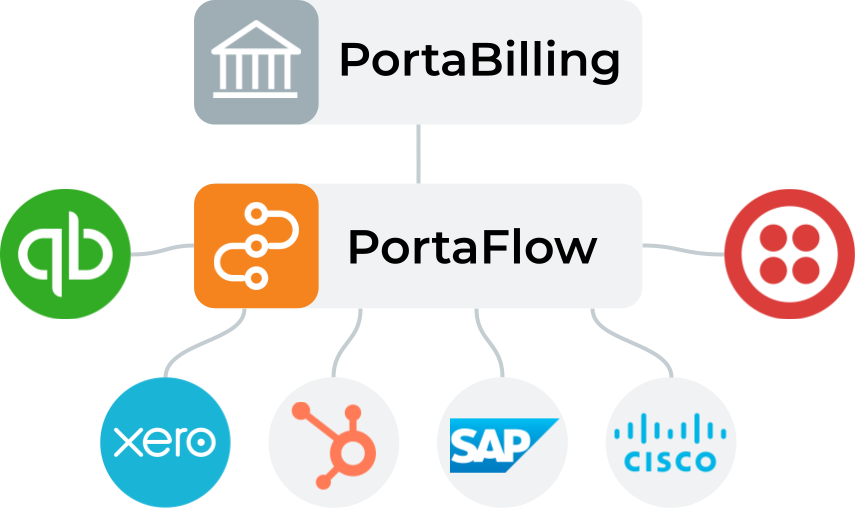
Both workflow solutions integrate with PortaBilling, but they automate different parts of your ecosystem.

NSPS architecture

NSPS connects PortaBilling with network elements and external applications through APIs, event-driven automation, and custom integration logic.

pub?w=1000

Event flow

NSPS listens for events in PortaBilling, executes custom business logic, and exchanges data with external systems through APIs and connectors. It is designed for telecom-specific integrations where provisioning, network communication, or custom processing is required.

Triggered by PortaBilling events

Customer creation, service activation, account updates, payments, or other events can automatically start a workflow.

Runs custom integration logic

Developers can add validation, transformations, business rules, and provisioning logic before communicating with external systems.

Communicates with external platforms

Connect network elements, SBCs, softswitches, payment gateways, or any application with an API.

Boomi Workflows architecture

Boomi Workflows orchestrates business processes across PortaBilling and enterprise applications using low-code workflows and pre-built connectors.

pub?w=1000

Event flow

Boomi Workflows orchestrates business processes that involve PortaBilling and multiple enterprise applications. Low-code workflows coordinate people, approvals, and system integrations without requiring custom application development.

Connects business applications

Exchange data with CRM, ERP, finance, ticketing, cloud applications, and other systems through Boomi connectors.

Coordinates business processes

Route approvals, trigger notifications, update records, and automate multi-step operational workflows.

Keeps applications synchronized

Information entered in one system automatically updates the others, reducing manual work and inconsistencies.

PortaOne Workflows playlist
We’ve collected so many inspiring tips, how-tos, and use cases for Boomi-based PortaOne Workflows that we’ve had to collect them all in one place. Visit our YouTube playlist for plenty of ideas on how this flexible, low-code integration platform could streamline your operations.

Build and deploy

Both workflow solutions are designed to integrate with your existing environment. Whether you're developing custom integrations or configuring business workflows, PortaOne provides the tools and guidance to accelerate implementation.

NSPS

Build custom connectors

Any developer familiar with REST APIs and JSON can build an NSPS connector using Python, Node.js, Java, or another modern language. No prior PortaBilling experience is required. ​

Start with proven examples

Instead of starting from scratch, you can:

Deployment

NSPS is managed by PortaOne in the cloud. Your connector runs wherever it makes the most sense for your business – as a Docker container on AWS, Google Cloud, or your own infrastructure.

Boomi Workflows

Build low-code workflows

Design workflows using Boomi's visual low-code tools. Extend them with JavaScript or Groovy when needed. Familiarity with the PortaBilling API helps when building more advanced integrations.

Leverage prebuilt integrations

Accelerate implementation using:

  • Hundreds of Boomi connectors for applications such as Salesforce, SAP, HubSpot, and many others available at 
  • PortaOne’s ready-to-use telecom and business workflow templates, which you can customize for your own processes – see below.

Deployment

Deploy the Boomi runtime on your own cloud, in Boomi-managed cloud infrastructure, on PortaOne-managed infrastructure, or in your own data center.

Telecom

  • PCRF content-based billing – Automate quota management and policy control based on subscriber usage.
  • Cisco IoT Control Center – Provision IoT/M2M SIM cards and activate services after successful payment.
  • Combined M2M quotas – Share data quotas across multiple SIM cards assigned to the same customer.
  • MTN, Globalscape, & Google Maps – Provision mobile data services, allocate numbers, and trigger location-based workflows.
  • Cloud PBX provisioning – Automatically provision CloudPBX services using customer data from HubSpot.

Business systems

  • SAP Business One – Synchronize customer, subscription, and SIM card data between SAP and PortaBilling.
  • HubSpot ↔ PortaBilling – Automatically create and synchronize customer records between HubSpot and PortaBilling.
  • Freshdesk – Create and update support tickets based on events in PortaBilling.
  • QuickBooks – Synchronize invoices and payments between PortaBilling and QuickBooks.
  • Automated invoicing & payments – Exchange invoices and payment information with accounting systems such as Xero or Bexio.

Client feedback

Hear what our customers say about utilizing a powerful and empowering iPaaS integration solution built with a visual low-code/no-code platform.

Let's discuss your integration​

Whether you're automating service provisioning or connecting business applications, we'll help you choose the workflow solution that fits your architecture.

Schedule a personal (video) call with sales or technical experts
Ask for a thorough presentation delivered by our team
Request all technical specs and documentation

Resources and FAQ

Resources

Whether you’re evaluating, building, or deploying workflow automation, these resources will help you get started.

For NSPS developers

For Boomi Workflows

Documentation

FAQ

What is the difference between PortaOne Workflows and traditional integration methods?

Traditional integrations typically require developers to write and maintain custom code that calls the PortaBilling API and external system APIs to synchronize data. This includes implementing event queuing, retry logic, and error handling.

PortaOne Workflows provides two solutions to reduce that effort:

  1. NSPS is a lightweight cloud provisioning system designed for real-time provisioning of subscriber-level events (such as SIM card activation or product change). With NSPS, you only need to write a small microservice that receives ready-to-use subscriber data from NSPS and calls the target system’s API to apply the change. NSPS automatically manages everything else including extracting the needed subscriber data (e.g., their product settings) from PortaBilling, queuing events, and handling retries and errors.
  2. Boomi is a no-code/low-code integration platform (iPaaS) for automating complex business processes. Instead of building integrations from scratch, you can use visual workflow design, hundreds of prebuilt Boomi connectors, and PortaOne’s ready-to-use telecom workflow templates to integrate PortaBilling with CRM, ERP, accounting, helpdesk, and other enterprise applications.

With PortaOne Workflows, you can connect PortaBilling to external systems with minimal or no coding, and launch your services faster.

Let’s look at each solution included in PortaOne Workflows separately.

NSPS

NSPS is typically used for simple, one-step provisioning actions. 

When a subscriber lifecycle event occurs (such as SIM activation or a plan change), NSPS picks it up, enriches it with all the relevant data (such as subscriber service configuration), and delivers it to your connector. The connector is a small microservice that receives the event data from NSPS and calls the target system’s API to apply the change (e.g., to activate a SIM card in an HSS or update a subscriber’s profile in an IPTV platform). NSPS manages event queuing, retries, and replays of failed events, so you don’t need to implement this logic in your connector.  

Boomi low-code platform

A Boomi workflow is a configured sequence of steps, and Boomi’s platform is typically used for complex, multi-step workflows that synchronize PortaBilling with business applications.. For example, when a new customer is created in PortaBilling, a workflow might create a corresponding record in a CRM, update an order in an ERP, and send a confirmation email to the customer. 

A workflow can be triggered automatically by an event in PortaBilling, launched manually, or run on a schedule. Boomi uses PortaBilling’s API to obtain the necessary context, and connects to external applications via pre-built or custom connectors, executing the configured sequence of actions.

PortaOne Workflows integrates with the Boomi low-code platform to work with business applications such as CRM, ERP, accounting, and helpdesk systems. 

You can leverage hundreds of prebuilt connectors developed and maintained by Boomi and its partner ecosystem to quickly connect PortaBilling with widely used systems such as Salesforce, HubSpot, SAP, and many more, without building connectors from scratch. On top of that, PortaOne provides ready-to-use sample workflows for common telecom use cases which you can use as templates and adjust only the parameters you need. Examples include automated invoice and payment synchronization with an external accounting system, customer data exchange between CRM and billing, or automatic ticket creation in a support system based on specific events. For unique scenarios you can create a custom integration in Boomi using its visual no-code UI or low-code scripting.

For NSPS, your team (or your integration partner) typically develops and maintains the connector that communicates with the external system. Any developer familiar with REST APIs and JSON can build a connector – no special knowledge of PortaBilling is required. PortaOne provides the NSPS connector implementation guide and a working sample connector on GitLab that you can use as a starting point and adapt for your system. New connectors can also be built using AI coding assistants. NSPS itself is deployed and managed by PortaOne in the cloud. 

On the Boomi platform, workflows which connect PortaBilling with external applications via connectors, can be configured by your own team, an external integration partner, or PortaOne engineers. If your team is taking this on, you’ll need someone proficient with Boomi’s architecture and low-code programming. PortaOne provides workflow templates that can be adapted to your business processes instead of building workflows from scratch.

With NSPS, you can build connectors for any system that delivers services to end users and requires near real-time, one-step updates such as mobile network components (HSS, PCRF) or IPTV platforms.

With Boomi, you can connect PortaBilling to virtually any business application. For hundreds of widely used applications (such as Salesforce, HubSpot, SAP, QuickBooks, and Xero) prebuilt connectors are already available. For other systems, a custom connector can be developed.

Related resources

Challenges of Expansion to Established Telecom Markets: The PortaOne Guide to Telecom Market Expansion

Your Guide to Telecom International Expansion

Telecom international expansion offers immense opportunities, but challenges like complex regulatory compliance and adapting to local market preferences require strategic planning. PortaOne’s guide shares insights from global experts to ensure your success


The 2024 PortaOne Barcelona Meetup Zhylenko & Khalenkov

PortaOne Barcelona Meetup 2024 Summary & Materials

The 2024 PortaOne Barcelona Meetup provided a unique opportunity for telco professionals to come together and collaborate. From insightful conversations with PortaOne executives to networking with industry peers, the event provided a relaxed atmosphere full of enriching interactions and valuable ideas

Join those
'in-the-know'

Never miss an update, software release, webinar, best practice or anything else.

Search PortaOne

Search

Hot topics